

Download Zip Files Opener – Free, Secure ZIP Extractor for Windows, Mac & Portable Use
Looking for a lightweight, fast, and secure way to open and extract ZIP files? Zip Files Opener is a free software tool designed for users who need a simple, no-frills solution for handling compressed archives. With a minimal footprint of just 1.29 MB, this portable application runs smoothly on older Windows systems and is perfect for users who want to avoid the bloat of heavy software suites like WinRAR or 7-Zip.
Whether you're working on a legacy machine, a public computer, or simply want a backup tool for quick file access, Zip Files Opener delivers reliable performance without compromising security. It supports drag-and-drop functionality, allows you to extract files instantly, and even enables the creation of new ZIP archives. Best of all, it’s completely free, ad-free, and malware-free — making it one of the safest options for everyday ZIP file management.
Key Features of Zip Files Opener
Zip Files Opener stands out in the crowded field of archive tools thanks to its streamlined design and robust functionality. Despite being released in March 2016, the software continues to serve users who prioritize speed, simplicity, and portability. One of its most notable features is its portable nature — no installation required. You can run it directly from a USB drive, external hard drive, or even a shared workstation without leaving traces behind. This makes it ideal for IT professionals, students, or anyone needing a temporary solution on public computers.
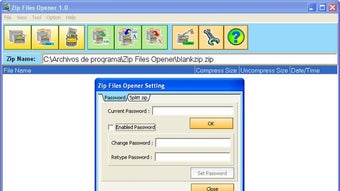
Another standout feature is its minimal system impact. At just 1.29 MB, the application uses negligible memory and storage, which is perfect for older systems like Windows 98, XP, Vista, NT, and Windows 7. While it doesn’t support Windows 10 or later, it remains a valuable tool for users still relying on legacy systems. The interface is intuitive and closely mirrors the standard Windows ZIP utility, ensuring a low learning curve for beginners.
Zip Files Opener also supports drag-and-drop extraction, allowing users to open ZIP files instantly by simply dragging them into the window. It can extract individual files or entire folders with a single click. Additionally, the tool lets you create new ZIP archives from selected files, which is useful for backup purposes or sending large files via email without exceeding size limits. All operations are fast, secure, and performed locally — no cloud dependencies or data uploads.
Installation & Usage: Simple, Fast, and Secure
One of the biggest advantages of Zip Files Opener is how easy it is to use. Since it’s a portable application, there’s no traditional installation process. To get started, simply download the ZIP file from the official source, extract it to your desired location — such as your desktop, a USB drive, or a dedicated folder — and run the executable file (ZipFilesOpener.exe). That’s it. No setup wizard, no registry changes, no system restarts.
Once launched, the interface is clean and straightforward. You’ll see a central window where you can either click “Open” to browse for a ZIP file or drag and drop the file directly into the window. The software instantly displays the contents of the archive, showing all files and folders inside.
To extract, select the files you want and click the “Extract” button. You can choose a destination folder or keep the default path. The extraction process is fast and doesn’t require any additional software.
For users who need to create their own ZIP files, the tool offers a “Create ZIP” option. Select the files or folders you want to compress, choose a location, and click “Create.” The resulting archive is ready to use immediately. This feature is especially helpful for backing up important documents or preparing large files for email or cloud transfer. All actions are performed offline, ensuring your data stays private and secure.
Compatibility & System Requirements
Zip Files Opener is specifically designed for older versions of Windows, making it a reliable choice for users still running legacy systems. It is fully compatible with Windows 98, Windows ME, Windows XP, Windows Vista, Windows NT, and Windows 7. However, it does not support Windows 10, Windows 11, or any newer operating systems due to architectural changes and deprecated APIs.
This limitation is important to note, especially for users upgrading their hardware or software. If you’re using a modern PC with Windows 10 or later, you may want to consider alternatives like 7-Zip, PeaZip, or WinRAR. That said, for those working on older machines — whether in schools, small businesses, or personal setups — Zip Files Opener remains a solid, lightweight option.
Despite its age, the software is still secure and functional. It doesn’t require administrator rights to run, and because it’s portable, it doesn’t install any drivers or background services. This reduces the risk of system conflicts and makes it ideal for environments with strict IT policies. The application is also free to download, use, and distribute — no trial periods, no hidden fees, and no ads.
Pros and Cons
- Pros:
- Extremely lightweight (only 1.29 MB)
- Portable – no installation required
- Fast and intuitive drag-and-drop interface
- Free, ad-free, and malware-free
- Supports ZIP extraction and creation
- Perfect for older Windows systems
- Runs on public or shared computers safely
- Cons:
- Not compatible with Windows 10 or later
- Limited to ZIP format (no support for RAR, 7Z, etc.)
- No advanced features like password protection or split archives
- Outdated interface compared to modern tools
- No automatic update notifications
Frequently Asked Questions (FAQ)
Is Zip Files Opener free to download and use?
Yes, Zip Files Opener is completely free to download, use, and distribute. There are no trial periods, subscription fees, or hidden costs. The software is also ad-free and malware-free, ensuring a secure experience.
Can I use Zip Files Opener on Windows 10 or Windows 11?
Unfortunately, Zip Files Opener is not compatible with Windows 10 or Windows 11. It was designed for older Windows versions including Windows 98, XP, Vista, NT, and Windows 7. For newer systems, consider using 7-Zip or PeaZip.
Is Zip Files Opener portable?
Yes, it is fully portable. You can run it directly from a USB drive, external hard drive, or any folder without installing it. No registry changes or system modifications are made.
Can I create new ZIP files with this tool?
Yes, Zip Files Opener allows you to create new ZIP archives from selected files or folders. Simply choose the files, click “Create ZIP,” and select a destination.
Does Zip Files Opener support password-protected ZIP files?
No, Zip Files Opener does not support password-protected ZIP archives. It only works with standard, unencrypted ZIP files.
Final Verdict & Call to Action
If you’re working on an older Windows system or need a lightweight, no-install ZIP tool for temporary use, Zip Files Opener is a reliable and secure choice. Its minimal size, portability, and ease of use make it perfect for quick file extraction and basic compression tasks. While it lacks advanced features and modern OS support, it excels in simplicity and safety.
For users who value speed, privacy, and a clean interface without bloat, this free software is worth downloading. Whether you're a student, teacher, or IT technician managing legacy hardware, Zip Files Opener offers a trustworthy solution for handling ZIP files.
Download Zip Files Opener today and enjoy a fast, secure, and lightweight way to open and manage your compressed files — no installation, no hassle, just results.







